Hybrid k3s · Part 1
Hybrid k3s #1: Cloud and home into one cluster — initial setup
0. About this series
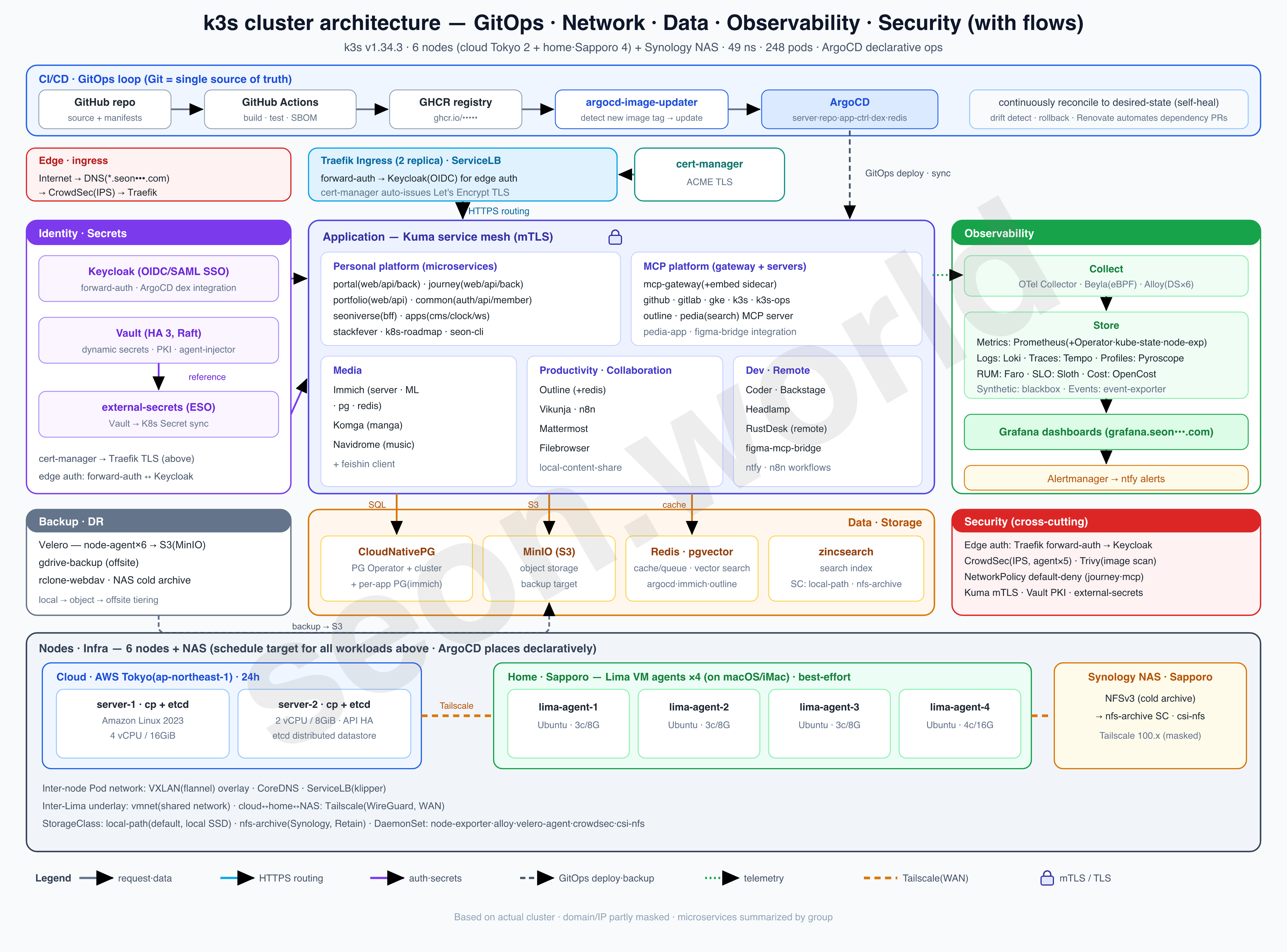
This series is a record — written one piece at a time — of how I actually built the homelab shown in the diagram above, the one I’m running right now.
What started as a toy project from a simple “could this even work?” turned, through satisfying performance and endless tearing-down-and-rebuilding, into a genuine toy that relieves the stress built up at work.
It isn’t a resource-rich cluster, but it has been more than enough to get a real taste of Kubernetes, and it keeps giving me new things I want to try next.
- 6 nodes — 2 Lightsail servers (control plane + etcd) in the cloud (AWS Tokyo) + 4 Lima VM agents on a home (Sapporo) iMac
- 19 vCPU / 61 GiB total, 49 namespaces, 248 pods (150 running)
- Deployment via ArgoCD, authentication via Keycloak OIDC, with CloudNativePG, Vault, CrowdSec, Prometheus/Grafana, and more running on top
It wasn’t easy, but it wasn’t hard enough to give up on either — so I’m going to write up, one at a time, the things I learned while building it and the things I want to keep.
This first story is about the foundation — how I started from two control-plane nodes in the cloud.
1. Background
There was no grand blueprint to begin with. The starting point was ordinary.
Working with Kubernetes in my day job, things I want to dig into more keep coming up. Reading the docs is one thing; breaking and fixing a cluster with my own hands is another. There’s an environment I can touch at work too, but it’s limited, and a careless mistake there leads to noisy, annoying situations — so there were limits.
I needed a cluster I could run however I wanted.
As it happened, a 64GB-RAM iMac, more than 10 years old, was sitting mostly idle at home. It still performs well enough, but it has an HDD so it’s slow, its OS is past end-of-support, and it has handed its seat to a MacBook Pro M4 and is now resting. On the cloud side, I already had two small Lightsail instances running personal services, and as those services grew, resources were gradually getting tight.
“What if I stopped keeping the idle home machine’s resources and the cloud I’m already paying for separate, and used them as one?”
The urge to learn and the pressure on resources converged on a single idea — combine the cloud and home into one cluster. This article is the first dig: building the cloud-side foundation.
2. Why k3s — a choice under limited resources
First, let’s prepare a Kubernetes (k8s) environment.
But for the resources I had in my cloud environment, standard k8s was too heavy. In my dreams I wanted to run wild on a multi-cluster with thousands of nodes; in reality it was a small AWS Lightsail instance of about $150/month and a single 10-plus-year-old iMac near retirement.
I had to pick “which Kubernetes to go with” first. Here’s what my research turned up.
| Option | Character | For this situation |
|---|---|---|
| Managed (EKS/GKE/AKS) | The cloud runs the control plane for you | Control-plane fee + node cost → conflicts with low cost / reusing idle gear, excluded |
| Vanilla Kubernetes (kubeadm) | Assemble upstream yourself | The most orthodox but heavy and hands-on → a burden for low-spec/small scale, excluded |
| k3s (Rancher/SUSE) | Single-binary lightweight distro | Lightweight distro — finalist |
| k0s · MicroK8s | Lightweight distros of a similar kind | Likewise lightweight distros — finalist |
| minikube · kind | For local dev/testing | Not meant for persistent multi-node operation → excluded |
Filtering this way, the candidates narrowed to three lightweight distros: k3s, k0s, and MicroK8s. Digging deeper into the three:
| Item | k3s (chosen) | k0s | MicroK8s |
|---|---|---|---|
| Maker | Rancher/SUSE | Mirantis | Canonical |
| Packaging | Single binary | Single binary | snap package (depends on snapd) |
| Default datastore | SQLite (kine); embedded etcd for HA | etcd standard (kine for other DBs too) | dqlite (distributed SQLite, Raft) |
| HA approach | Switches to etcd with multiple servers | Provided by default | Automatic HA at 3+ nodes |
| Control plane | server also runs workloads | Internal components as separate processes, control-plane isolation | Per node |
| Default CNI | flannel (lightweight, limited policy) | kube-router/calico | calico (HA variant) |
| Bundling | Essential components included (Traefik, ServiceLB, local-path…) | Minimal, easy to swap default components | Enable add-ons with microk8s enable |
Why k3s.
All three are CNCF-compliant lightweight distros, but they differ in character.
k0s keeps the control plane separate from workloads, which is clean, but it ships with fewer things, so there’s more to plug in yourself.
MicroK8s has the convenience of enabling add-ons with a single microk8s enable line, but in return it’s tied to snap, and there are reported cases of dqlite CPU/consensus instability on write-heavy clusters. (GitHub Issue #3227)
k3s, on the other hand, has essential components bundled into a single binary, so the initial setup is the fastest, and the path of moving to embedded etcd with multiple servers fits naturally with this kind of “cloud + home HA.” Add low-spec/ARM support and the depth of its docs and community, and for the goal of learning and low-cost operation at once, k3s fit best. (comparison sources: Palark · Portainer · nOps)
k3s repackages that Kubernetes as a single binary (under 100MB) while staying 100% compatible (CNCF certified). Its requirements are essentially just a modern kernel + cgroups, so it’s no strain even on low-spec hardware. (What is K3s)
Just three reasons it’s light:
- Single binary, single process. Components that run separately in regular Kubernetes —
kube-apiserver,kube-scheduler,kube-controller-manager,kubelet,kube-proxy— are wrapped into onek3sprocess, with the containerd runtime built in. (Architecture) - Flexible datastore. A single server uses SQLite by default; with multiple servers, embedded etcd is selected automatically (external MySQL/Postgres are also possible). (Datastore)
- Essential components included. flannel (CNI), CoreDNS, Traefik (Ingress), ServiceLB, local-path (storage), and metrics-server are brought up together at install time. That’s that much less to assemble yourself.
As a bonus, k3s nodes come in two kinds — server (control plane + datastore) and agent (workload only) — which made it a good match for a hybrid setup like “cloud = server, home = agent.” You’ll see this in the diagrams from chapter 4 onward.
3. The control plane — three is the rule, but a two-node challenge
Originally I ran personal services in the cloud with Docker Compose. The small instance handled the DB, and the large instance handled several microservices. Moving these two to Kubernetes, my first worry was the control plane.
For Kubernetes to be stable, control-plane HA is the baseline. k3s’s embedded etcd can’t accept writes unless it keeps a majority (quorum), and the official HA guide recommends 3 or more servers (an odd number). With n nodes the quorum is (n/2)+1, and the node count minus the quorum is how many node failures you can tolerate.
| servers | quorum | failures tolerated |
|---|---|---|
| 1 | 1 | 0 |
| 2 | 2 | 0 |
| 3 | 2 | 1 |
| 4 | 3 | 1 |
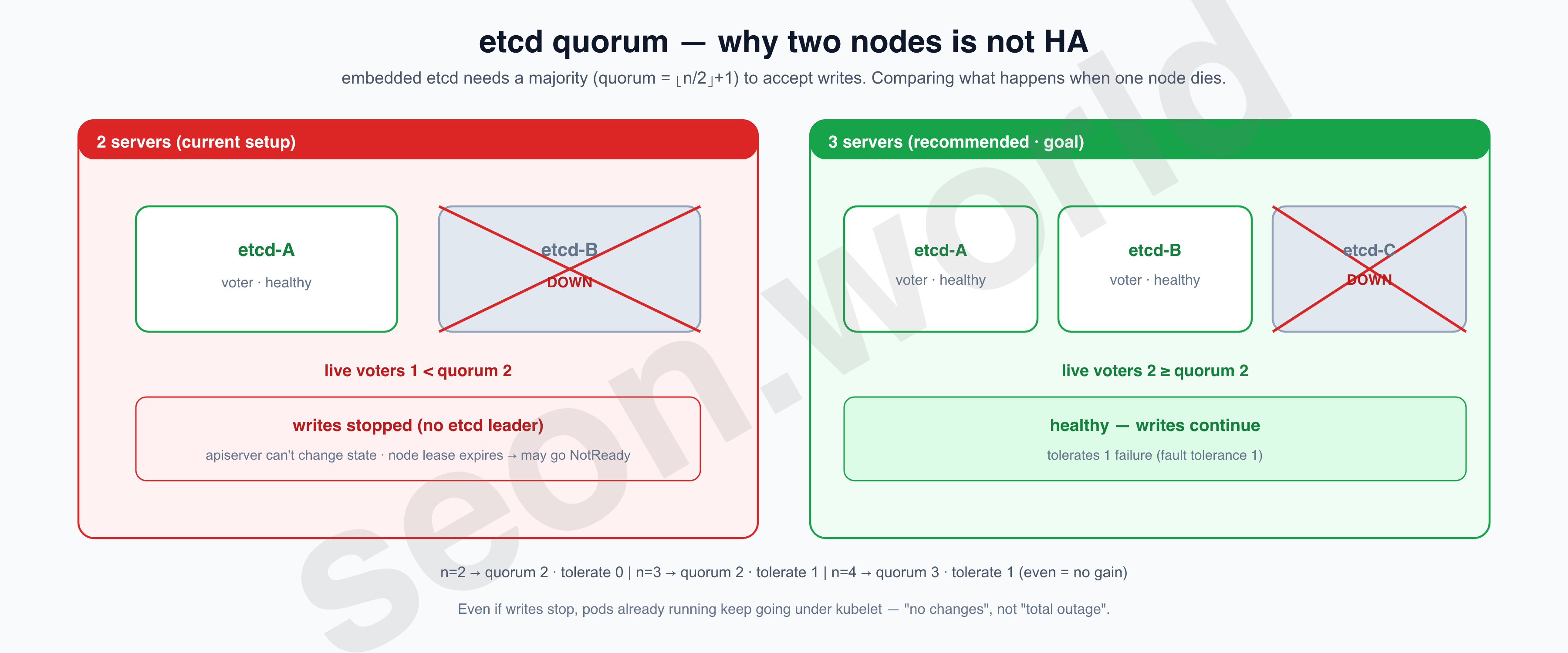
The rule is three. But adding one more instance was tight on the wallet, so I changed the goal:
I know three is the right answer, but for now let me run two as stably as possible.
In choosing two, I made two things clear.
First, don’t pile everything on one node.
I once put the control plane and services all on a single node and got badly burned. Lightsail is a burstable CPU model: each plan has a per-vCPU baseline %, and when load stays above it for a while it spends the burst capacity it had accrued, dropping to baseline once it hits 0. With the control plane (apiserver, etcd) on the same node, the moment the CPU dries up, cluster control itself stops — so I split the load across two nodes.
| node | plan | vCPU | baseline | role |
|---|---|---|---|---|
| server-A | 8GB ($44/mo) | 2 | 30% | cluster-init · control-plane+etcd+worker |
| server-B | 16GB ($84/mo) | 4 | 40% | join · control-plane+etcd+worker |
Checking usage at the time of writing, both are below baseline (the sustainable zone), accruing burst (kubectl top nodes):
NAME           CPU(cores)   CPU%   MEMORY(bytes)   MEMORY%
cp-8gb-init    482m         24%    4565Mi          58%
cp-16gb-join   1153m        28%    10096Mi         65%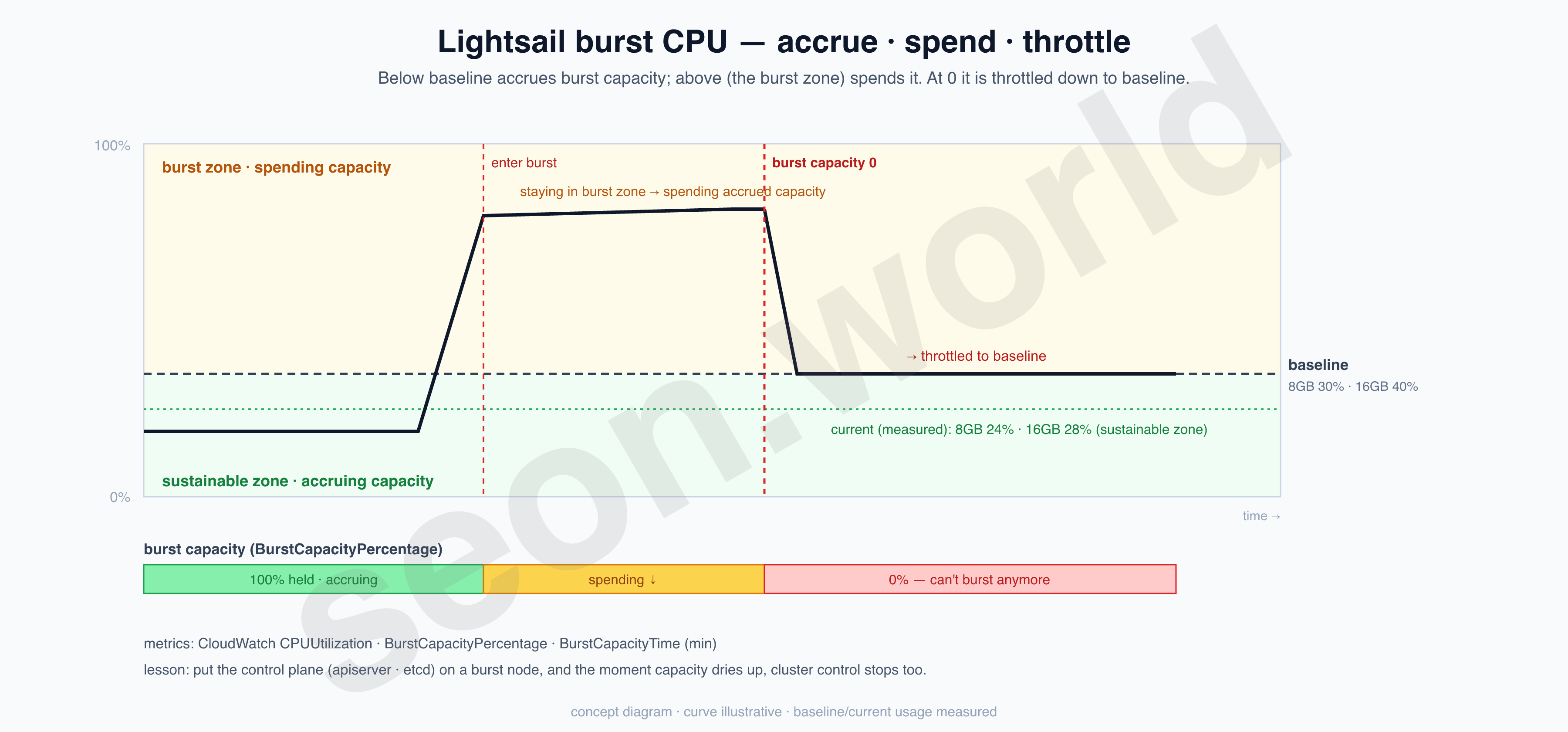
Second, admit that two is not HA, and take out insurance.
As the table shows, with two nodes, losing even one loses quorum and writes stop (pods already running keep going under kubelet, so it’s “no changes” rather than “total outage”). I cover that risk with etcd automatic snapshots. Since I gave no extra config, it runs with k3s defaults — 0 */12 * * * (twice a day), keep 5, stored at /var/lib/rancher/k3s/server/db/snapshots. (etcd-snapshot) Since they only pile up locally, pushing them to NAS/object storage later is a task I’ve left for the backup installment.
4. Today’s star — Tailscale
The control plane is on Lightsail in Tokyo; the machine I’ll use as a worker is the home iMac in Sapporo.
These two don’t share a private network.
The home machine sits behind a router on a private IP (192.168.x), so it can’t be reached directly from outside, and opening ports to expose it would mean exposing cluster ports like kubelet (10250) and VXLAN (8472) to the internet — dangerous. For k3s to bind nodes into one cluster, everyone has to be able to call each other by one stable address, and the current setup doesn’t have that.
So I went looking for a method among VPNs and meshes.
| Option | Character | For this situation |
|---|---|---|
| Direct port exposure + public IP | Expose as-is without a VPN | Effectively exposes kubelet/VXLAN to the internet → dangerous, dropped |
| raw WireGuard | Fast kernel VPN, manual keys/peers | Fast, but NAT traversal, key management, and access control are all manual |
| OpenVPN | Traditional hub-style VPN | Hub-centric rather than mesh, heavy to set up |
| ZeroTier | Managed mesh VPN | A solid candidate, similar in flavor |
| Tailscale | WireGuard + coordination (mesh) | Automatic NAT traversal, ACLs, MagicDNS, unattended keys, free for personal use ← chosen |
| Headscale | Self-hosted Tailscale control server | More freedom but the burden of self-operation → consider later |
After a lot of trial and deliberation that took plenty of time, in the end I chose Tailscale. It’s a WireGuard-based mesh VPN: install a daemon on each machine and log in, and it joins a private network (a tailnet) tied to your account, with each machine getting one address in the 100.x range. That address is reachable by the same value from anywhere — whether the machine is in Tokyo or behind a router in Sapporo — and Tailscale handles NAT traversal for you.
It means you can lay down a “virtual LAN” that puts the cloud and home on one plane. (And up to 100 machines register for free.)
When k3s registers a node, it stamps the address given via --node-ip as that node’s identity (InternalIP). So by setting this value to a Tailscale address from the start, a home node joining later lands on the same 100.x plane as-is. That’s why I install Tailscale before k3s.
5. Tailscale: sign up · install · verify
The order is sign up → install → verify.
① Sign up. Log in at login.tailscale.com with an SSO account like Google, GitHub, or Microsoft, and a tailnet for that account is created automatically. There’s no separate signup form; SSO is the signup.

② (For servers) Prepare an auth key. Cloud servers have no browser, so issue an auth key (tskey-…) in advance from the admin console under Settings → Keys. You can skip this if you’ll connect interactively.
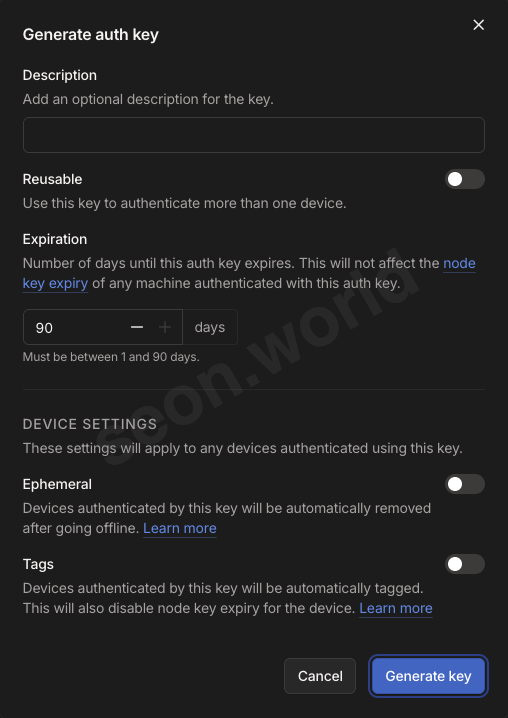
③ Install & connect. On each of the two cloud nodes (Amazon Linux 2023):
curl -fsSL https://tailscale.com/install.sh | sh
sudo tailscale up                 # authenticate via the printed URL (headless: --authkey tskey-… )
tailscale ip -4                   # this node's 100.x address — used directly as --node-ip in ch.6
④ Verify. If both nodes appear in the admin console Machines page (login.tailscale.com/admin/machines) with their 100.x address and hostname, it worked.
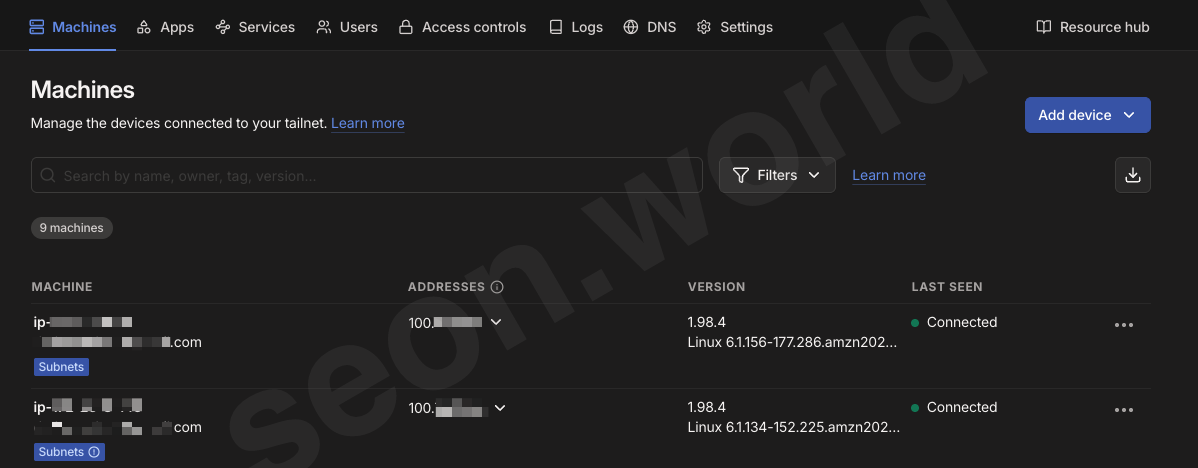
You can also check from the node:
tailscale status # list of machines in the tailnet + each one's 100.xWith this, the two cloud nodes see each other by 100.x in one tailnet. Now I bring up k3s with these addresses. (Tailscale Linux install)
6. Installing k3s (with Tailscale addresses)
Put the 100.x you got in chapter 5 straight into --node-ip.
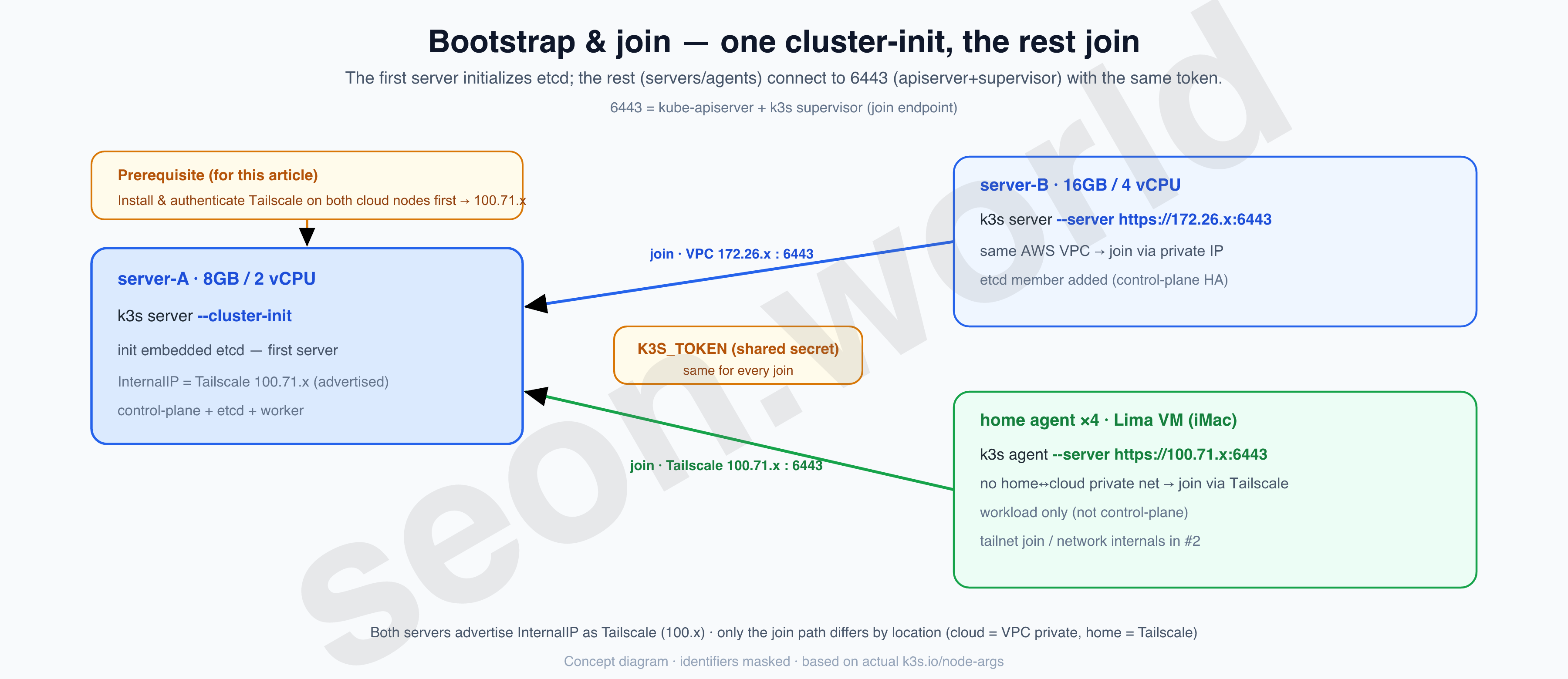
server-A (8GB):
curl -sfL https://get.k3s.io | K3S_TOKEN=<shared-secret> INSTALL_K3S_VERSION=v1.34.3+k3s1 \
  sh -s - server \
    --cluster-init \
    --node-ip 100.71.x.x \
    --node-external-ip <publicA> \
    --advertise-address 100.71.x.x \
--flannel-backend vxlan--cluster-init— initializes embedded etcd as the first server. (server flags)--node-ip 100.71.x.x— advertises the Tailscale address received in ch.5 as the InternalIP.--node-external-ip/--advertise-address— public IP (for external exposure), apiserver advertise address (Tailscale).--flannel-backend vxlan— CNI backend (the default, stated explicitly).
K3S_TOKEN can be a value you set yourself, like choosing a password, or left blank for k3s to generate automatically. But since you need to know this value to join, save it separately or just pass the value at the path below.
/var/lib/rancher/k3s/server/node-token
server-B (16GB) — joins as the second server. This node, too, joins the tailnet first, then just connects with the same token:
curl -sfL https://get.k3s.io | K3S_TOKEN=<secret> INSTALL_K3S_VERSION=v1.34.3+k3s1 \
  sh -s - server \
    --server https://172.26.x.x:6443 \
    --node-ip 100.99.x.x
--server https://172.26.x.x:6443= server-A’s address (a private IP, since it’s the same VPC).--node-ip 100.99.x.x= this node’s Tailscale address.
The two Lightsail boxes are in the same AWS VPC, so joining itself used the private IP, but the InternalIP advertised to the cluster is Tailscale (100.x) for both.
Firewall — open only the minimum externally. (requirements)
| port | use | exposure |
|---|---|---|
| 80 / 443 | Traefik Ingress | all |
| 22 | SSH | my IP only |
| 6443 / 2379-2380 / 8472 / 10250 | apiserver·etcd·flannel·kubelet | closed publicly, private/Tailscale internal only |
7. Cluster setup — complete with two nodes
Attaching the home iMac as an agent is covered in the next article.
For now I’ve built the cluster with two Lightsail boxes, Tailscale applied. Listing the nodes, you can confirm both are Ready on the same version and runtime.
kubectl get nodes -o wide

NAME           STATUS  ROLES               AGE   VERSION       INTERNAL-IP   EXTERNAL-IP    OS-IMAGE                       KERNEL-VERSION              CONTAINER-RUNTIME
…3-146(8GB)    Ready   control-plane,etcd  139d  v1.34.3+k3s1  100.71.x.x    52.x.x.x       Amazon Linux 2023.7.20250512   6.1.134-…amzn2023.x86_64    containerd://2.1.5-k3s1
…2-70(16GB)    Ready   control-plane,etcd  139d  v1.34.3+k3s1  100.99.x.x    3.x.x.x        Amazon Linux 2023.9.20251105   6.1.156-…amzn2023.x86_64    containerd://2.1.5-k3s1
Check whether the two nodes are etcd voting members (look at Conditions in kubectl describe node <name>):
Conditions:
  Type             Status   Reason                       Message
  ----             ------   ------                       -------
  EtcdIsVoter      True     MemberNotLearner             Node is a voting member of the etcd cluster
  MemoryPressure   False    KubeletHasSufficientMemory   kubelet has sufficient memory available
  DiskPressure     False    KubeletHasNoDiskPressure     kubelet has no disk pressure
  PIDPressure      False    KubeletHasSufficientPID      kubelet has sufficient PID available
  Ready            True     KubeletReady                 kubelet is posting ready status
Check that the k3s default bundle came up too (kubectl get pods -n kube-system):
# kubectl get pods -n kube-system  →  k3s default bundle only (excerpt)
coredns-7f496c8d7d-nx9jc                  1/1  Running    139d   # DNS
local-path-provisioner-578895bd58-mgxpm   1/1  Running    139d   # local storage (default SC)
metrics-server-7b9c9c4b9c-76ldg           1/1  Running    139d   # metrics (kubectl top)
traefik-78df465dcc-66kn8                  1/1  Running    9d     # Ingress (server-A)
traefik-78df465dcc-gs4q7                  1/1  Running    8d     # Ingress (server-B) → one per node = 2 replicas
helm-install-traefik-crd-pmk4t            0/1  Completed  139d   # Helm Job that installed the bundle (completed)
That concludes setting up two cloud instances as a k3s cluster. It isn’t just that I installed k3s — I also configured Tailscale so that, later, any machine can join as an agent regardless of where it is or what form it takes, as long as it’s an environment where k3s can be configured.
8. Next
The AWS Lightsail nodes are now formed into a cluster, and the groundwork for nodes to join is all set.
In the end it came down to one command per node, but this stage took more time than I expected.
To this two-node cluster, I’ll now bring in the iMac resting at home, in earnest. I’ll install Lima VMs on the iMac, create an agent on each, join them to the same tailnet, and write up the problems I ran into after joining — solving them along the way.
References
- k3s — What is K3s / Architecture / Datastore: https://docs.k3s.io/ · /architecture · /datastore
- k3s — HA Embedded etcd / Server flags / etcd-snapshot / Requirements: https://docs.k3s.io/datastore/ha-embedded · /cli/server · /cli/etcd-snapshot · /installation/requirements
- Lightweight distro comparison (k3s·k0s·MicroK8s): https://palark.com/blog/small-local-kubernetes-comparison/ · https://www.portainer.io/blog/k0s-vs-k3s · https://www.nops.io/blog/k0s-vs-k3s-vs-k8s/
- Tailscale — Linux install: https://tailscale.com/kb/1031/install-linux
- AWS Lightsail — burst CPU / baseline: https://docs.aws.amazon.com/lightsail/latest/userguide/baseline-cpu-performance.html