Hybrid k3s · Part 3
Hybrid k3s #3: Pods couldn't talk to each other — flannel VXLAN and vmnet
0. About this series
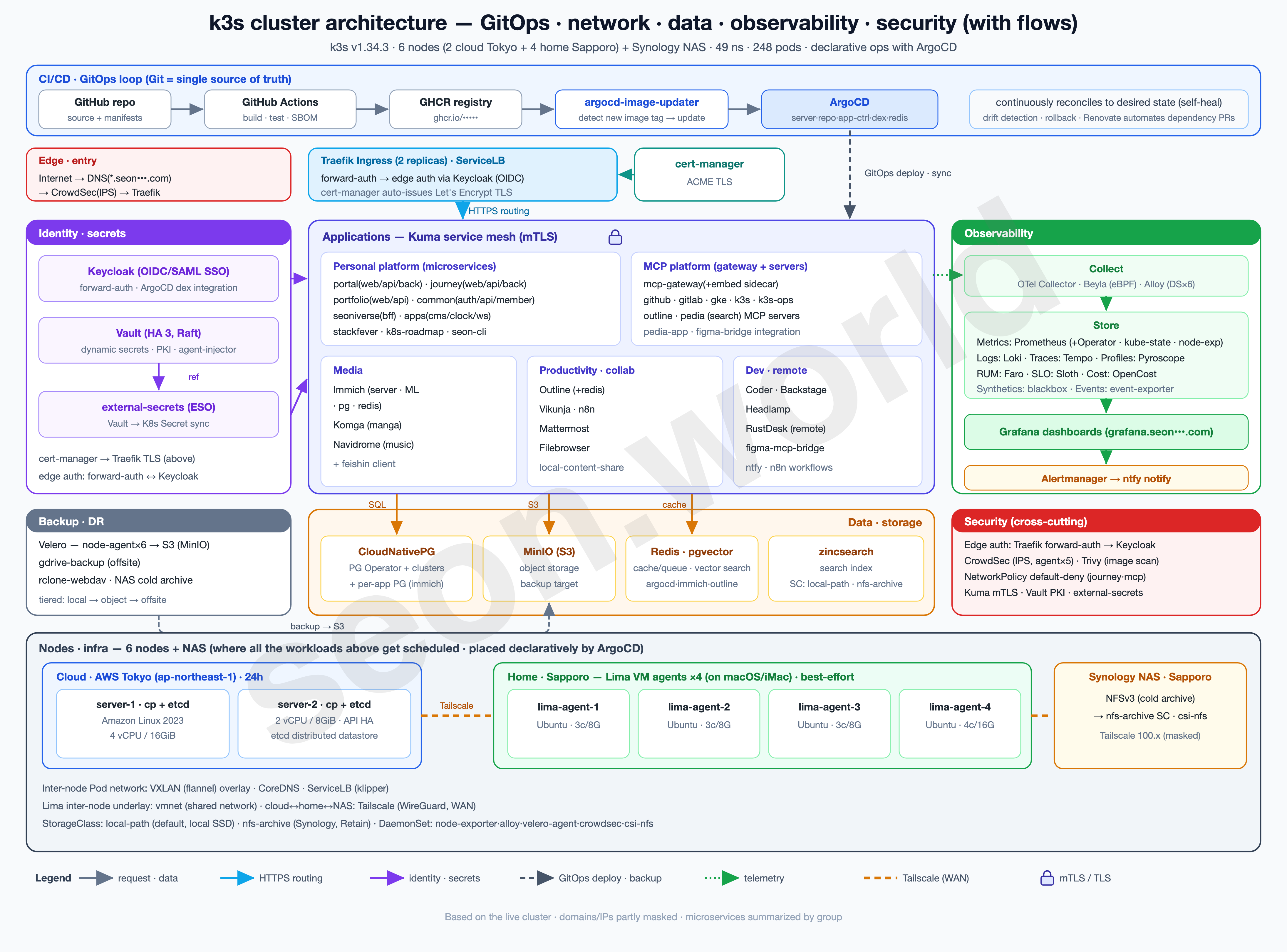
This series is a record — written one piece at a time — of how I actually built the homelab in the diagram above, the one that’s still running as I write this.
What began as a toy project from a simple “could this even work?” turned, through satisfying performance and endless tearing-down-and-rebuilding, into a genuine toy that takes the edge off the stress built up at work. It isn’t a resource-rich cluster, but it’s been more than enough to get a real taste of Kubernetes, and it keeps handing me the next thing I want to try.
- 6 nodes — 2 Lightsail servers (control plane + etcd) in the cloud (AWS Tokyo) + 4 Lima VM agents on a home (Sapporo) iMac
- 19 vCPU / 61 GiB total, 49 namespaces, 248 pods (150 running)
- Deployed with ArgoCD, auth via Keycloak OIDC, with CloudNativePG, Vault, CrowdSec, Prometheus/Grafana and more running on top
In #1 I stood up two cloud control-plane nodes, and in #2 I welcomed the home iMac as four Lima VM agents — and all six nodes went
Ready. This article is about what came next: the nodes were all connected, yet the Pods themselves couldn’t talk across nodes. I peer into flannel, follow where the packets actually go, and end up binding the VMs on the same iMac directly with vmnet.
1. Six nodes Ready, yet the Pods were strangers
The picture I left off on last time looked clean. Running kubectl get nodes, the two Tokyo servers and four Sapporo Lima agents were all Ready, with a Tailscale 100.x address in INTERNAL-IP.
$ kubectl get nodes -o wide
NAME               STATUS   ROLES                AGE    VERSION        INTERNAL-IP     OS-IMAGE             CONTAINER-RUNTIME
ip-172-26-2-70…    Ready    control-plane,etcd   143d   v1.34.3+k3s1   100.99.x.x      Amazon Linux 2023   containerd://2.1.5-k3s1
ip-172-26-3-146…   Ready    control-plane,etcd   143d   v1.34.3+k3s1   100.71.x.x      Amazon Linux 2023   containerd://2.1.5-k3s1
lima-k3s-agent     Ready    <none>               143d   v1.34.3+k3s1   100.84.x.x      Ubuntu 24.04.3 LTS  containerd://2.1.5-k3s1
lima-k3s-agent-2   Ready    <none>               143d   v1.34.3+k3s1   100.98.x.x      Ubuntu 24.04.3 LTS  containerd://2.1.5-k3s1
lima-k3s-agent-3   Ready    <none>               143d   v1.34.3+k3s1   100.117.x.x     Ubuntu 24.04.3 LTS  containerd://2.1.5-k3s1
lima-k3s-agent-4   Ready    <none>               143d   v1.34.3+k3s1   100.90.x.x      Ubuntu 25.10        containerd://2.1.5-k3s1
I thought I was done. So I eagerly started piling Pods on — and almost immediately hit a strange wall. Pods on the same node talked just fine, but Pods on different nodes couldn’t reach each other. Services timed out in odd places, and some Pods couldn’t even resolve DNS.
At first I thought, “every node is Ready — so why?” That was a misread. Ready and “the Pod network works” are at two different layers.
- Node Ready — the control-plane path, where a node’s kubelet trades heartbeats with the apiserver. That’s exactly what I’d set up so far: making the node and the apiserver reach each other over Tailscale
100.x. As long as this path is alive, a node looksReady. - Pod ↔ Pod (across node boundaries) — the data-plane path, where Pods on different nodes exchange packets directly. This is a completely separate road from the control plane, and the thing that lays it isn’t the kubelet but the CNI (here, flannel).
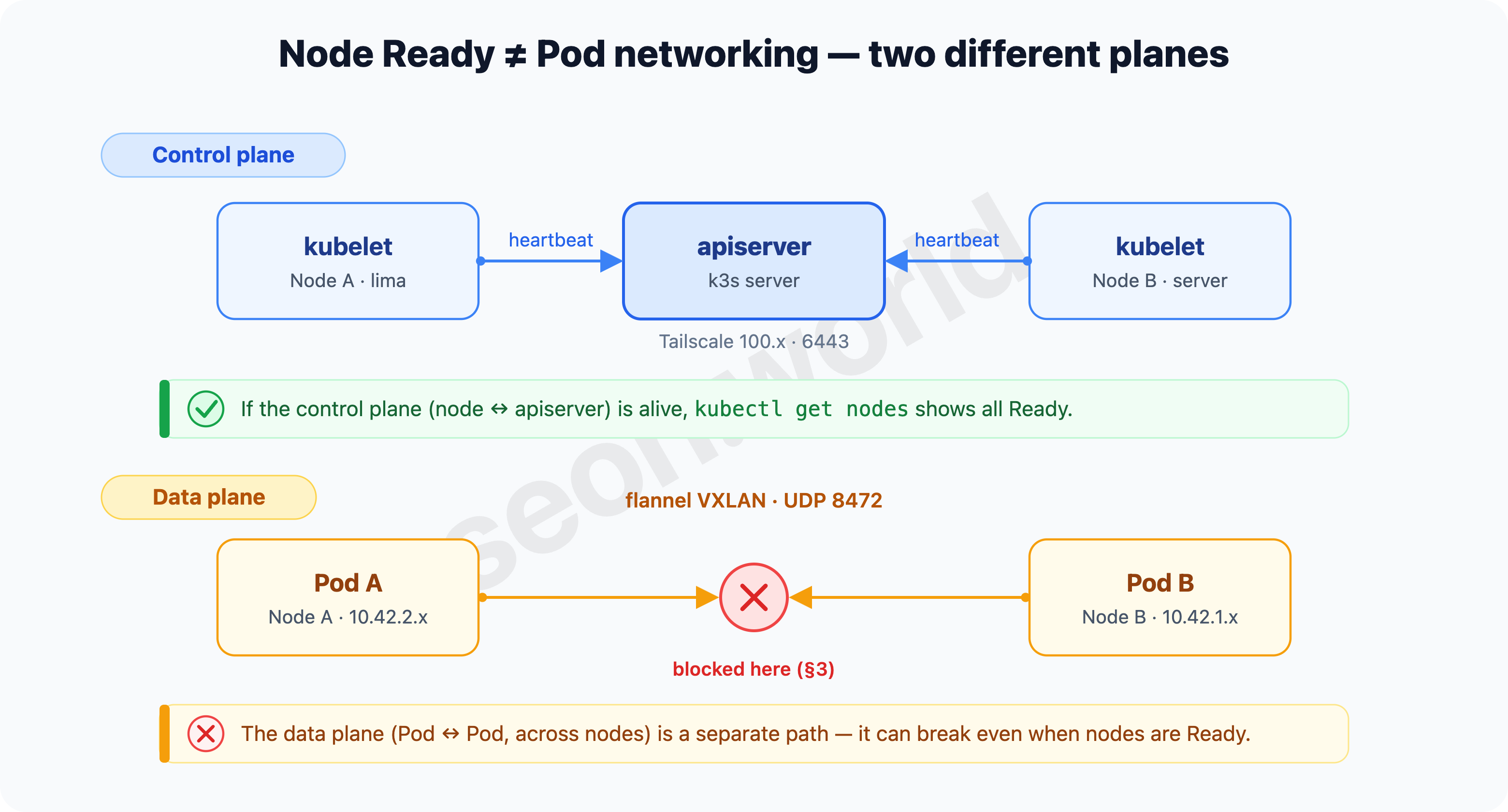
All six being Ready with a 100.x (Tailscale) INTERNAL-IP only means the control plane is sound. What finished last time went as far as “the nodes are recognized as members of one cluster” — the road that carries Pod traffic across node boundaries had not been verified yet.
Even with
kubectl get nodesallReady, inter-node Pod traffic isn’t guaranteed. The control plane (node ↔ apiserver) and the data plane (Pod ↔ Pod) are separate paths, and the latter is the CNI’s job. So the next question narrows to one thing — exactly how does flannel carry a Pod packet across node boundaries?
2. flannel and VXLAN — how a Pod packet crosses a node boundary
k3s uses flannel as its CNI and VXLAN as flannel’s default backend. In #1 I brought the servers up with --flannel-backend vxlan, and the #2 agents inherited that setting as-is. (k3s Basic Network Options — flannel’s default backend is vxlan; host-gw, wireguard-native, and none are the alternatives.)
Let me trace a Pod packet’s journey in two cases.
- Within the same node — every Pod hangs off the node’s
cni0bridge. Two Pods on the same node meet directly at L2 on that bridge. They never cross a node boundary, so it’s fast and never congested. (That’s why “Pods on the same node talked” in §1.) - To another node — when the destination Pod is on a different node, the packet leaves
cni0and enters a virtual interface calledflannel.1. This is VXLAN’s VTEP (VXLAN Tunnel Endpoint). Here the original Pod packet (Ethernet frame and all) is encapsulated whole inside a UDP packet and sent to the peer node.
The “address” and “port” that receive this capsule are the crux.
- The port is UDP 8472. On Linux, flannel’s VXLAN backend uses the kernel default port 8472/udp (only on Windows does it use the IANA standard 4789). So nodes must be able to reach each other on 8472/udp. (flannel backends — “On Linux, defaults to kernel default, currently 8472” · k3s network requirements)
- The address is each node’s advertised
public-ip. flannel advertises, per node, a destination (the VTEP’s outer IP) that says “this is where I receive VXLAN capsules.” The default is the IP of that node’s default-route interface (the per-node real values are in §5). This “which address gets advertised” is what trips us up all the way through.
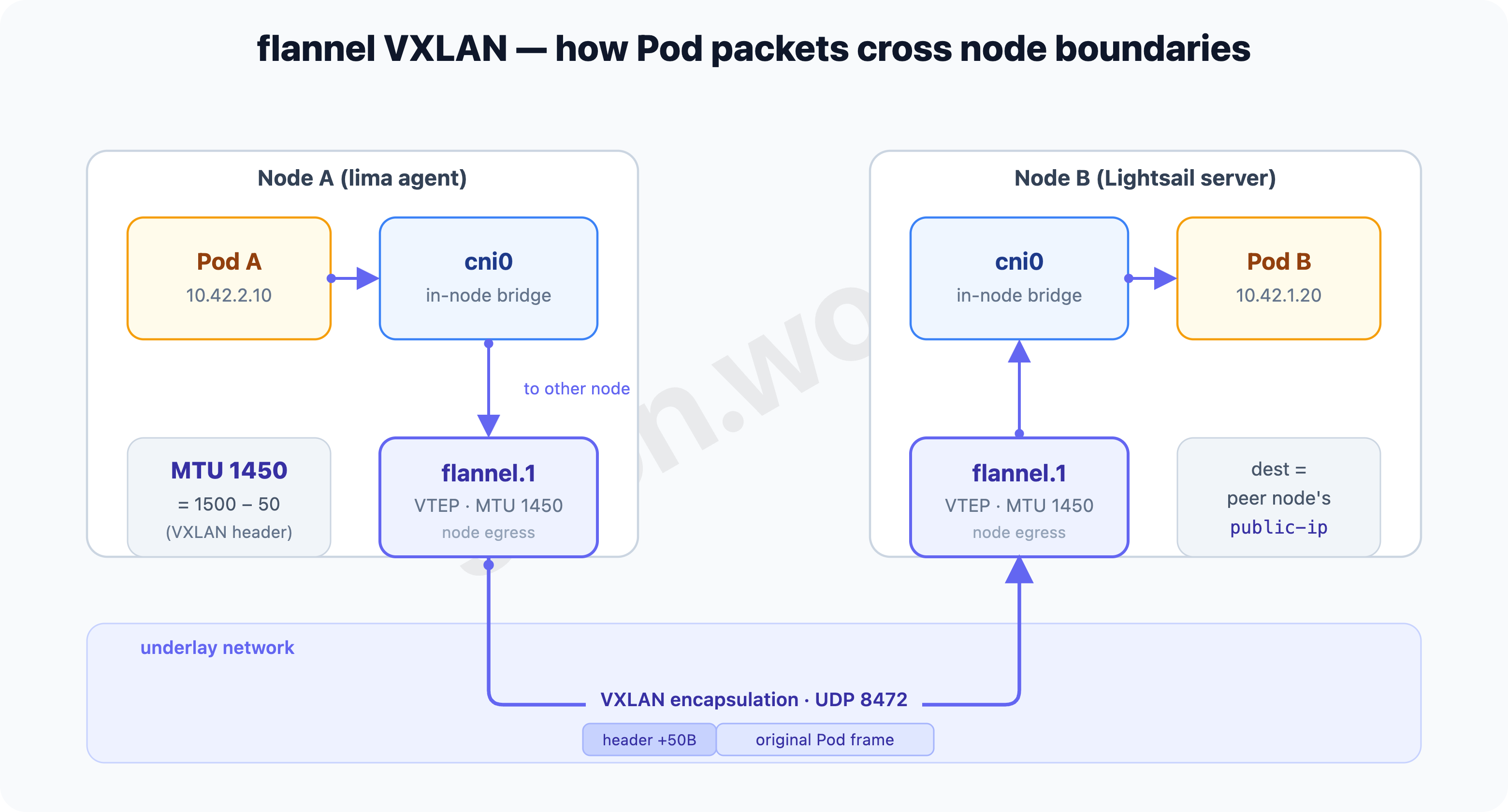
Encapsulation isn’t free. The VXLAN header (outer IP/UDP + VXLAN + inner Ethernet) eats an extra 50 bytes per packet. So flannel sets flannel.1’s MTU to the host interface’s MTU minus 50. If the host is 1500, flannel.1 becomes 1450.
On an agent node (lima-k3s-agent), it looks like this:
$ cat /run/flannel/subnet.env
FLANNEL_NETWORK=10.42.0.0/16
FLANNEL_SUBNET=10.42.2.1/24
FLANNEL_MTU=1450
FLANNEL_IPMASQ=true

$ ip -br link | grep -E 'eth0|lima0|tailscale0|flannel'
eth0         UP   ... mtu 1500
lima0        UP   ... mtu 1500
flannel.1    UNKNOWN ... mtu 1450     # 1500 - 50 (VXLAN)
tailscale0   UNKNOWN ... mtu 1280     # this 1280 bites in §5
That flannel.1 is a VXLAN device sending to port 8472 shows up in one line with -d (details):
$ ip -d link show flannel.1
5: flannel.1: <...> mtu 1450 qdisc noqueue state UNKNOWN ...
    vxlan id 1 local 192.168.105.2 dev lima0 srcport 0 0 dstport 8472 nolearning ttl auto ...
vxlan id 1 with dstport 8472 — “VXLAN → send to 8472” is right there in that line. The trailing local 192.168.105.2 dev lima0, i.e. “which address/interface this node sends VXLAN out of,” is the real key this time — but why it has that value is something §5 untangles.
MTU — the maximum size of a single packet
The output above showed mtu 1500, mtu 1450, and mtu 1280. Since this number bites hard in §5, let me pin it down here.
MTU (Maximum Transmission Unit) is the maximum size (in bytes) of a single packet an interface can carry at once. Ethernet’s standard default is 1500, so an ordinary NIC starts at 1500. A packet larger than the MTU is split into fragments, or — if it can’t be split — simply dropped. Fragmenting is slow, and dropping makes traffic look like it’s stalled.
The crux is that the more you wrap, the less real size fits inside. Wrap a box in a bigger box and the outer size (1500) stays the same, but what fits inside shrinks by the padding. That’s why each interface has a different MTU.
| Interface | MTU | Why this value |
|---|---|---|
eth0 / lima0 | 1500 | bare Ethernet default, no encapsulation |
flannel.1 | 1450 | 1500 − 50. The ceiling so that one VXLAN-header (50B) wrap still stays under 1500 |
tailscale0 | 1280 | WireGuard’s encryption overhead + a conservative value safe on any link (IPv6’s minimum MTU) |
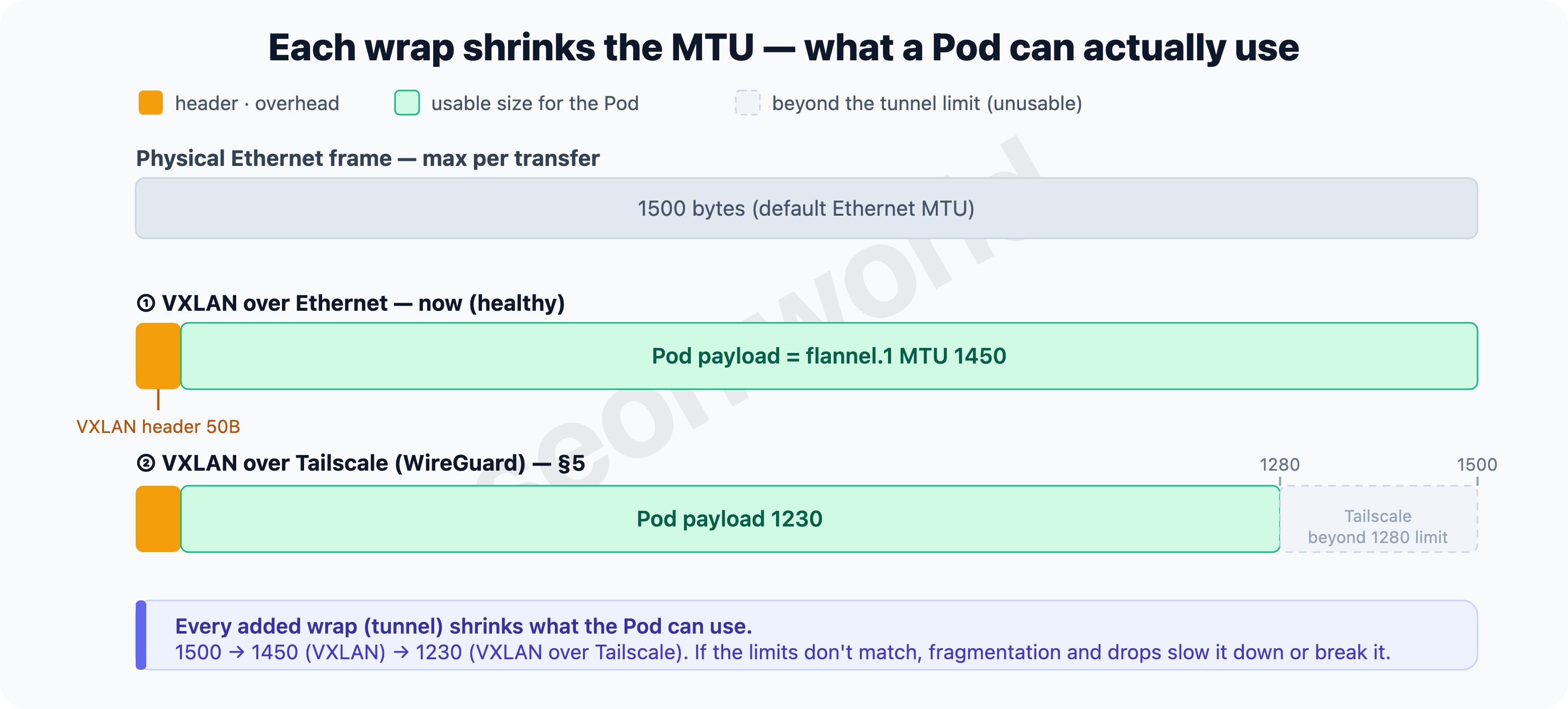
If flannel VXLAN runs over physical Ethernet (1500), 1450 fits nicely. The problem is when inter-node traffic rides over Tailscale — a Pod packet gets wrapped once by VXLAN and again by WireGuard on top, doubly wrapped, and the size that fits inside shrinks further to about 1280 − 50 = 1230. flannel still sends as if it had 1450, and when the tunnel can’t accept that much, the gap erupts as fragmentation, drops, and retransmits. Why this “double encapsulation” wrecks even latency is covered in §5.
Inter-node Pod traffic ultimately reduces to “can the nodes exchange UDP 8472 to each other’s
public-ip?” If that’s blocked, the Pod network breaks (§3); if the path is slow, the Pod network is slow (§5). It’s enough to remember thattailscale0’s MTU is 1280 — putting VXLAN on top of it shrinks the ceiling further.
3. Inter-node traffic failed, so I opened 8472
If §2’s conclusion holds, cross-node Pod traffic comes down to “can the nodes exchange 8472 (VXLAN) to each other’s public-ip?” So when traffic failed, there was one most-likely suspect — 8472 is blocked.
That’s because in #1 I’d closed the firewall by the book. Cluster ports like the apiserver (6443), kubelet (10250), and flannel VXLAN (8472) aren’t opened to the public net; they’re reachable only inside the private network / tailnet — the right default for minimizing exposure (#1’s firewall table). So “inter-node VXLAN is blocked on the public net, which is why inter-node Pod traffic fails” was a natural hypothesis.
Inside the node, flannel was indeed listening on 8472:
$ sudo ss -ulnp | grep 8472
UNCONN  0   0   0.0.0.0:8472   0.0.0.0:*
The port is open inside the node, yet it doesn’t reach Pods on another node — so what’s blocked isn’t inside the node but the road between nodes, I figured. On a “just make it work” impulse, I broke the principle and opened 8472/udp inbound on the Lightsail firewall. Inter-node Pod traffic went through, and I ran it that way.
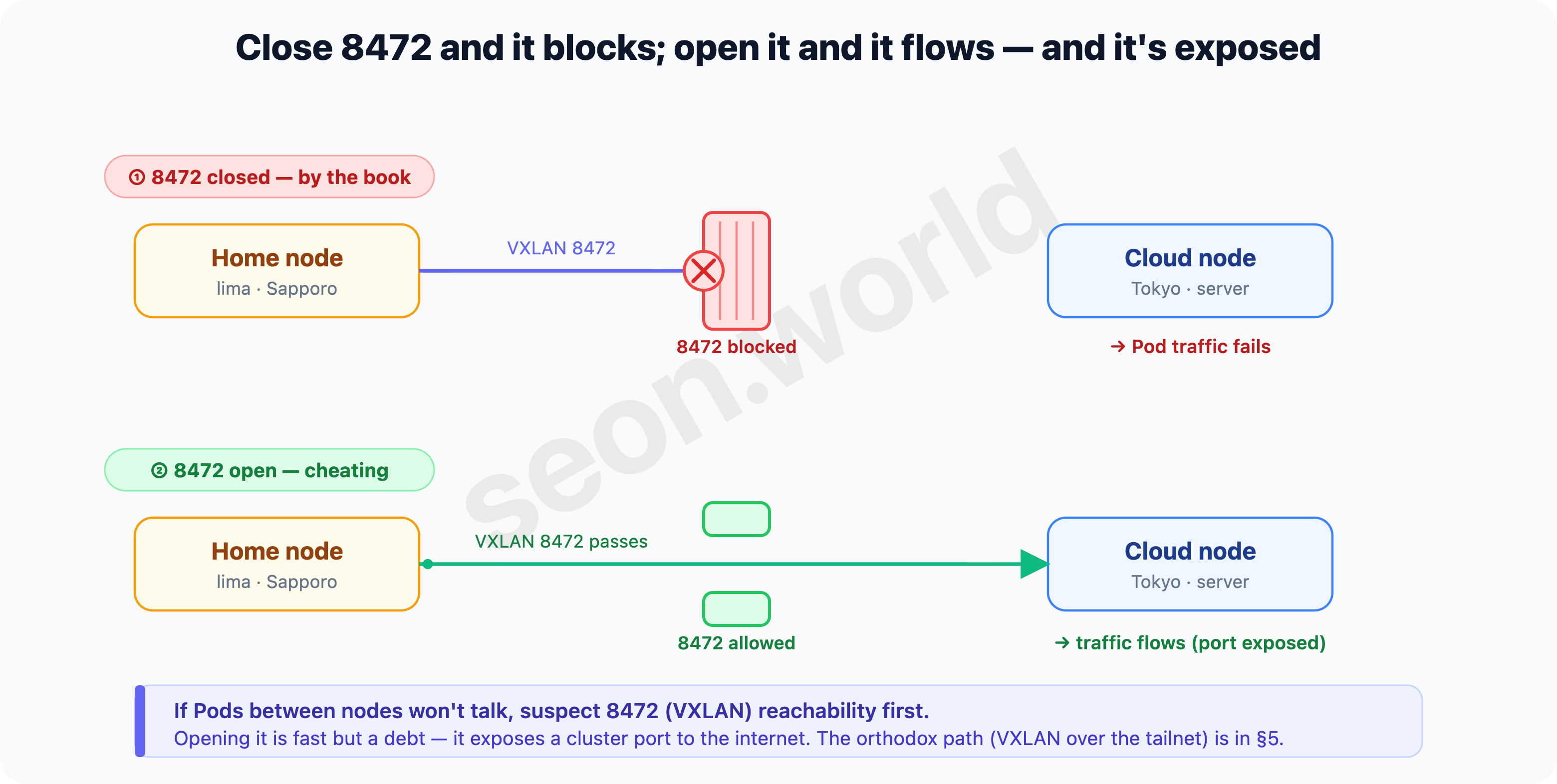
Note — not a recommended setup. Unlike 6443, 8472 isn’t a port guarded by certificates and tokens; opening it to the public net itself widens the exposed surface. “It went through, so this is the answer” was what I thought at the time, but “opening the port made it work” doesn’t mean “the port is why it worked” — this judgment gets overturned in §8 when I look at the actual route.
When inter-node Pod traffic fails, suspecting inter-node 8472/udp (VXLAN) reachability first is a reasonable starting point. But here I opened it to the public net, and that was a debt. The bill arrives in the very next section.
4. I added Longhorn and the restarts wouldn’t stop
Now that Pods could talk, I wanted to run a stateful workload “like a real cluster.” I picked Longhorn — distributed block storage for Kubernetes.
The reason is simple. k3s’s default storage (local-path) is a hostPath tied to one node’s disk, so it has no replication — when a Pod moves to another node, the data doesn’t follow. To try “data survives even if a node dies,” you need distributed storage that replicates data across multiple nodes. Longhorn is the CNCF project that fills that role: it stands up a dedicated controller (the Longhorn Engine) per volume, treats each volume like a microservice, and keeps synchronous replicas of it on multiple nodes’ local disks. (Longhorn — What is Longhorn?)
Install was one Helm line, and at first it looked fine. Pods came up Running and volumes were created.
But almost immediately, errors and restarts began repeating endlessly. Volumes dropped to Degraded, replica syncs timed out, rebuilds spun up to fix them, that load made them fail again — a self-reinforcing vicious cycle. Even though I hadn’t rebuilt the cluster, nodes got shaken, and other Pods on top got dragged in.
The cause was inter-node latency. Longhorn’s synchronous replication waits, for every single write, until the replicas respond “written.” That’s why Longhorn’s docs state plainly that “latency is far more important to a volume’s stability than throughput or IOPS” (Longhorn Best Practices), and the troubleshooting guide goes further, recommending inter-node latency under 20ms when multiple volumes do I/O on one node at the same time (Longhorn KB — volume readonly / I/O error).
But latency between the home (lima) nodes was far above that. Measured, the replica’s synchronous-write latency averaged 200ms+ — over ten times the recommended 20ms. Since synchronous replication eats that whole latency on every write, volumes couldn’t climb out of Degraded, and rebuilds and restarts spun forever. In the end Longhorn effectively dropped the lima (home) nodes from storage, and the goal of “run stateful workloads on a real multi-node cluster” looked impossible on top of this latency.
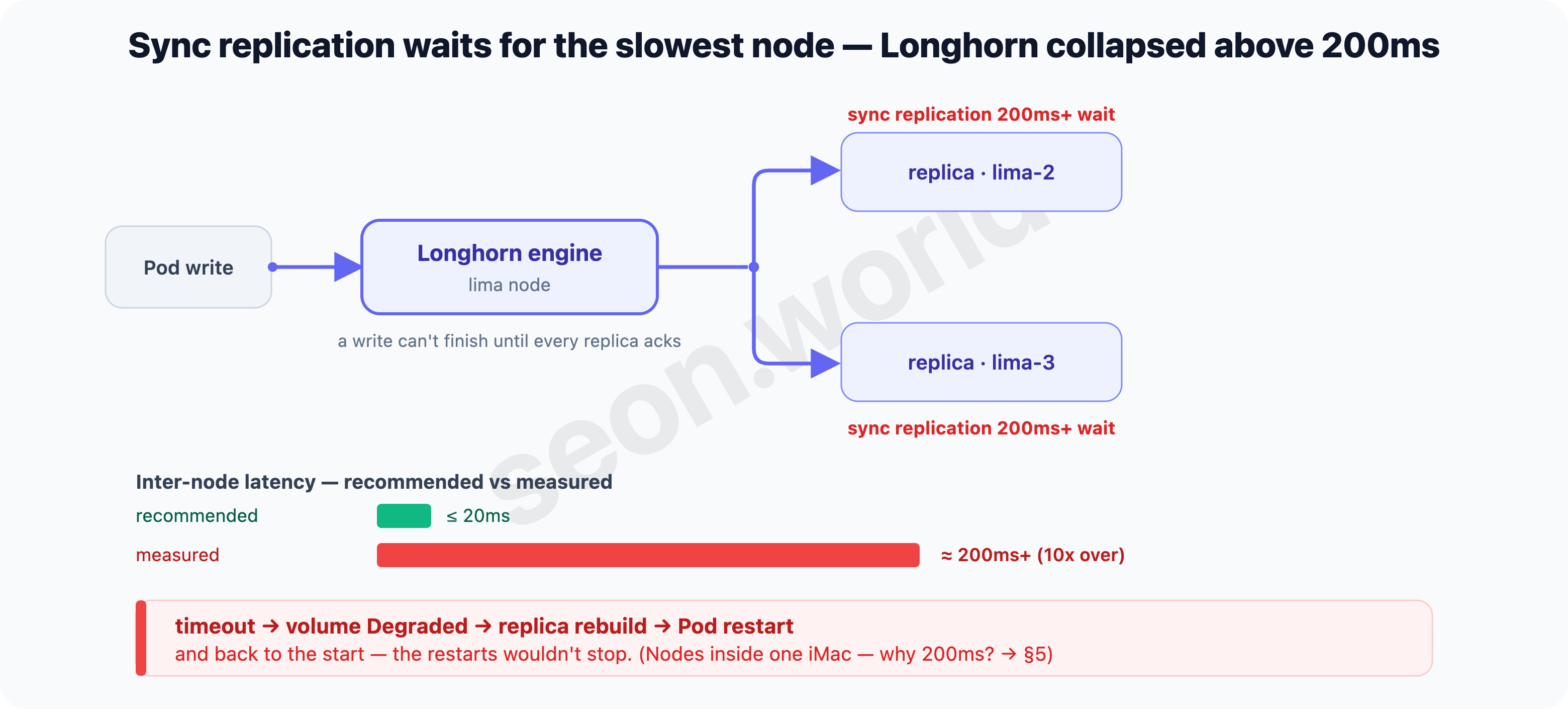
There was one more thing that didn’t add up. Those four too-slow home nodes are physically inside the same single iMac. They’re VMs in one machine — so where does 200ms come from? The next section follows that route.
5. Same host, so why slow? — to reach the next node, packets went to Tokyo and back
§4’s puzzle was this: four VMs inside one iMac, yet 200ms of inter-node latency. Let me follow where the packets actually go.
Clue 1 — there’s no direct path between VMs on the same host. Printing each VM’s address is odd:
$ limactl shell k3s-agent   -- ip -4 addr show eth0 | grep inet
    inet 192.168.5.15/24 ... eth0
$ limactl shell k3s-agent-2 -- ip -4 addr show eth0 | grep inet
    inet 192.168.5.15/24 ... eth0
Both VMs’ eth0 are 192.168.5.15. Lima’s default user-mode network fixes the subnet at 192.168.5.0/24, and each VM gets the same address behind its own independent NAT. So they’re unreachable directly from the host and from other guests (VMs) — they don’t even know each other, despite being inside the same iMac. Lima’s own docs note this limitation and point you to “use VMNet to access from the host or other guests” (Lima — user-mode network).
Clue 2 — with no direct path, even reaching the next VM takes the long-distance road. Since the VMs can’t reach each other directly, inter-node packets (including Pod VXLAN) take the one common path — the Tailscale (100.x) that bound both sites in #1 and #2. Reaching the VM right next door is no different. Tailscale is a tool for connecting long distances across NAT, so when a direct (P2P) path isn’t possible, it detours through a relay (DERP). Here’s what tailscale netcheck said:
$ tailscale netcheck
   * MappingVariesByDestIP: true       ← NAT where direct P2P is hard (endpoint-dependent mapping)
   * Nearest DERP: Tokyo (30.3ms)
With MappingVariesByDestIP: true, a direct connection isn’t possible, so Tailscale detours through the nearest DERP relay — Tokyo. A packet from Sapporo’s VM A to its neighbor VM B left the house, went all the way to Tokyo, and came back to Sapporo.
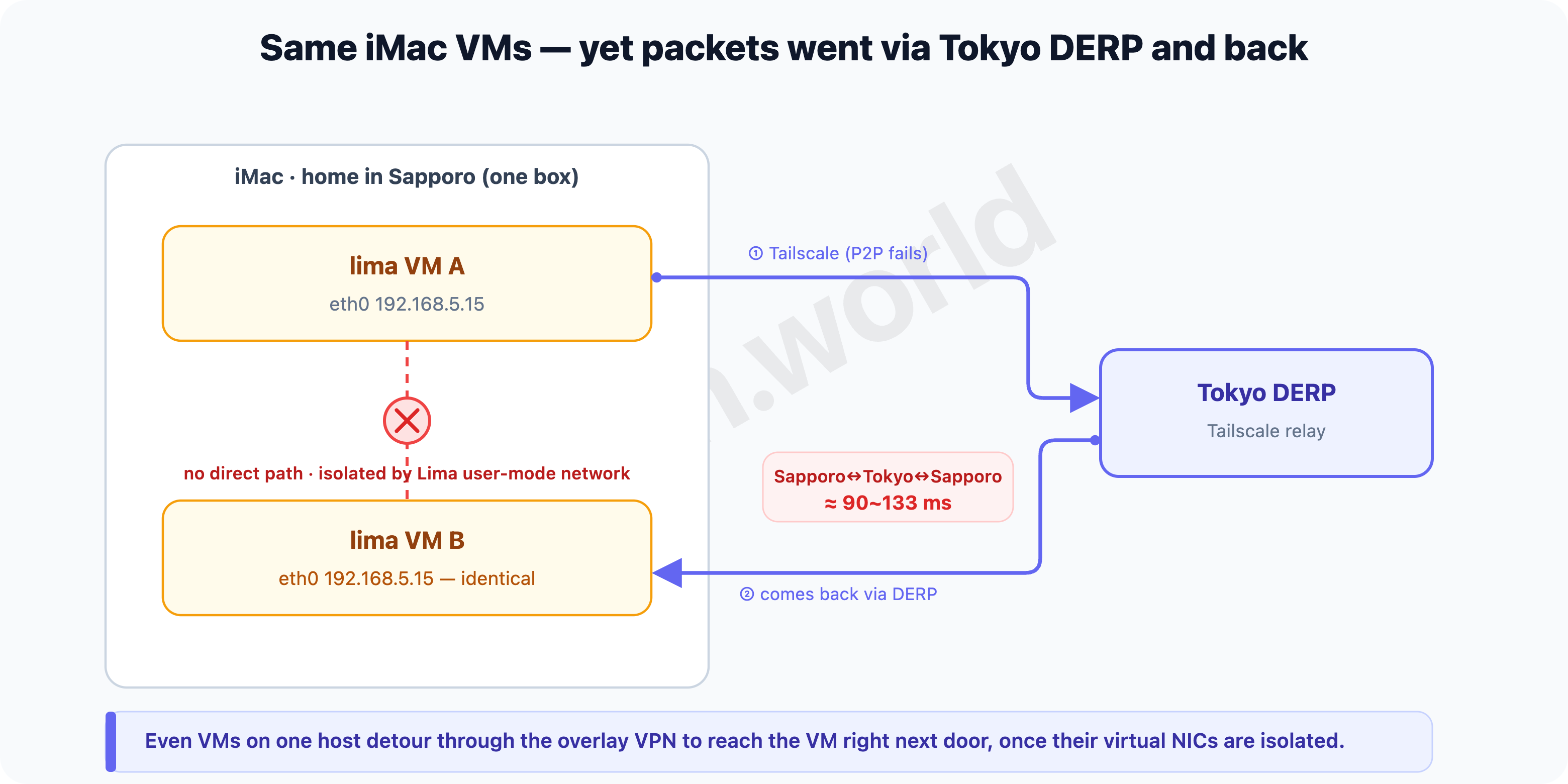
Clue 3 — measure it and that detour is right there. Latency between VMs on the same iMac:
lima ↔ lima-2 :  87 ms (max 202, jitter 54)
lima ↔ lima-3 : 133 ms (max 268, jitter 92)
Tens to a hundred ms for the VM right next door — the cost of a Tokyo round-trip. And at this point the home nodes’ Pod VXLAN, whose destination (public-ip) is a tailnet 100.x, has flannel VXLAN riding on top of Tailscale (WireGuard) as well — piling on §2’s double encapsulation and the MTU-1280 squeeze. Since Longhorn’s synchronous replication ate this round-trip on every write, 200ms was the obvious result.
Everything so far is about VMs inside the same iMac (lima ↔ lima). The cross-site link (home ↔ Tokyo) takes a different path (no double encapsulation there), covered separately in §8.
Nodes being on the same physical host doesn’t make them fast. When the virtualization network isolates the VMs, even talking to the VM right next door can detour far away through the overlay. Nearby traffic should end nearby — and §6 and §7 find that road.
6. How to fix it
The problem was clear. The four VMs on one iMac have no LAN that reaches each other directly, so even traffic to the VM next door goes through the long-distance Tailscale + DERP. I lined up the candidates for fixing it.
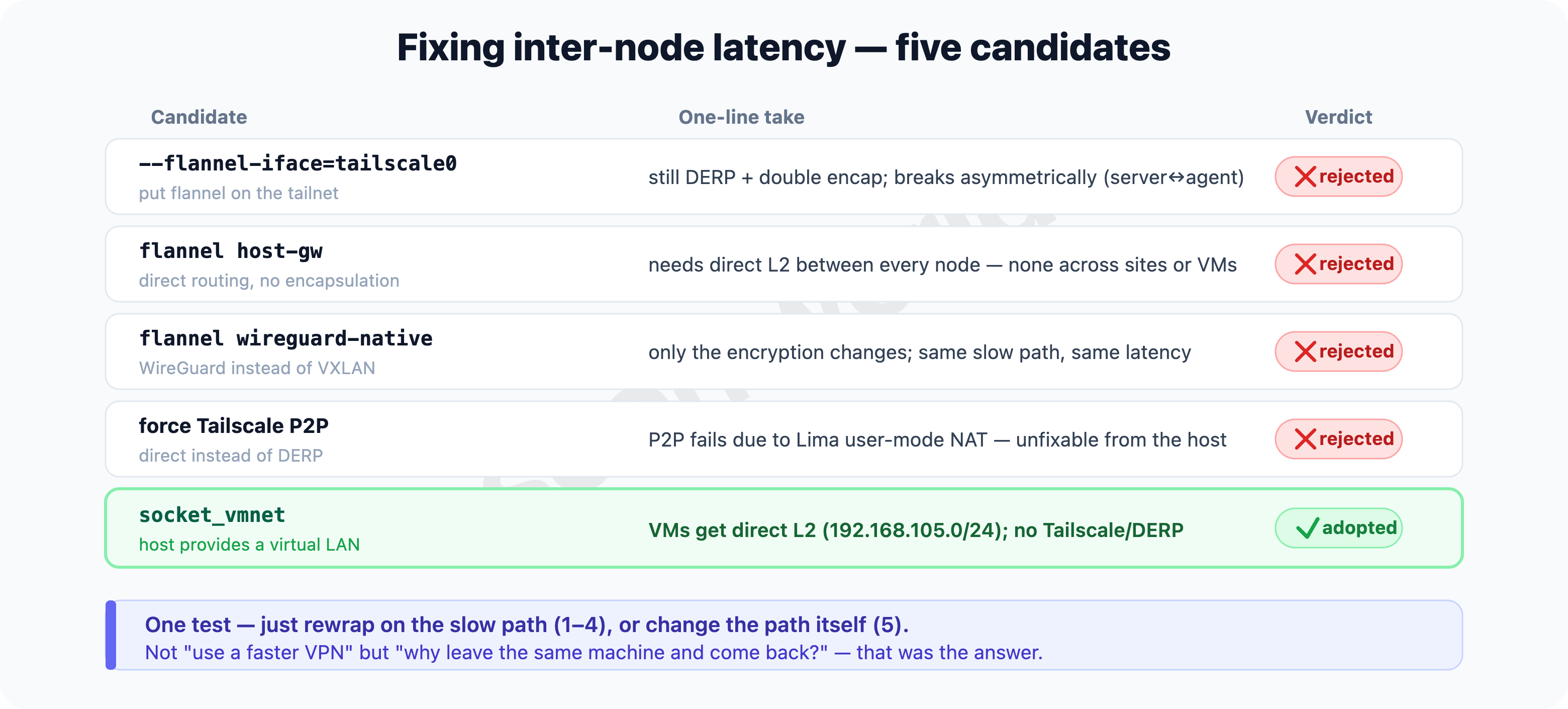
- Pin flannel to tailscale0 (
--flannel-iface=tailscale0) — put VXLAN explicitly on the tailnet. But the root problem (a long-distance detour and double encap despite being on the same host) stays. And the servers use a VPC address; setting only the agents totailscale0makes the destinations disagree, and it breaks asymmetrically — traffic passes one way only (you’d have to change both, touching #1’s server config too). Latency doesn’t drop either. - flannel’s
host-gwbackend — route directly to node IPs with no encapsulation; fastest. But it assumes direct L2 connectivity between all nodes (k3s docs). There’s no L2 between Tokyo and Sapporo, and none between the user-mode-isolated VMs either. - flannel’s
wireguard-nativebackend — encrypt with WireGuard instead of VXLAN. Good for security, but it still runs over the same detour path, so latency is unchanged. - Force Tailscale into P2P — connect directly instead of via DERP. But what blocks the direct path is Lima’s default user-mode network isolating the VMs, so it can’t be solved from the Tailscale side alone.
What 1–4 have in common is that they just change the wrapping on a slow path. The path itself (leaving the same machine and coming back) stays, so latency doesn’t drop. So I flipped the idea around.
- Use the fact that they’re on the same host — give the VMs a real LAN. Since the four live in one iMac, if the host lays a virtual LAN and lets the VMs talk directly at L2, they never go through Tailscale or DERP at all. This is exactly the method Lima’s docs recommend for the user-mode isolation (VMNet), implemented on macOS via socket_vmnet. ← adopted.
The test for picking a candidate was one thing — “does it remove the root cause of the latency (no direct path)?” 1–4 try to “go faster” or “re-wrap with a different VPN” and leave the path alone, but vmnet changes the path itself into a LAN inside the house. Then Tailscale handles the long-distance Tokyo ↔ Sapporo leg, and same-host traffic ends at home. The next section applies it and checks the result.
7. Laying a LAN inside the house with socket_vmnet
7-1. vmnet and socket_vmnet
The problem from §5 was “the VMs on one iMac have no LAN that reaches each other directly.” What fills that gap is vmnet.
vmnet is macOS’s built-in virtual-networking framework (vmnet.framework) — Apple’s official API that builds NAT, bridges, and host networking for VMs. But using it directly requires the VM process to hold root privileges and an entitlement, which is a hassle. socket_vmnet is a small daemon built by the Lima project that wraps this vmnet.framework and exposes it over a Unix socket. Only the socket_vmnet daemon runs as root; the VMs just connect to that socket — the VMs themselves don’t need to run as root. (That’s why the install in 7-2 puts the binary in a root-owned /opt and lays down a sudoers entry.) (socket_vmnet)
socket_vmnet offers three modes:
- shared — a private subnet (
192.168.105.0/24) + internet NAT. The VMs connected to the same socket_vmnet sit on one virtual switch (L2) and talk to each other directly. ← what we need. - bridged — joins the VMs straight onto the host’s physical LAN (e.g.
en0). - host — an isolated network with no internet.
How the structure changes is the crux.
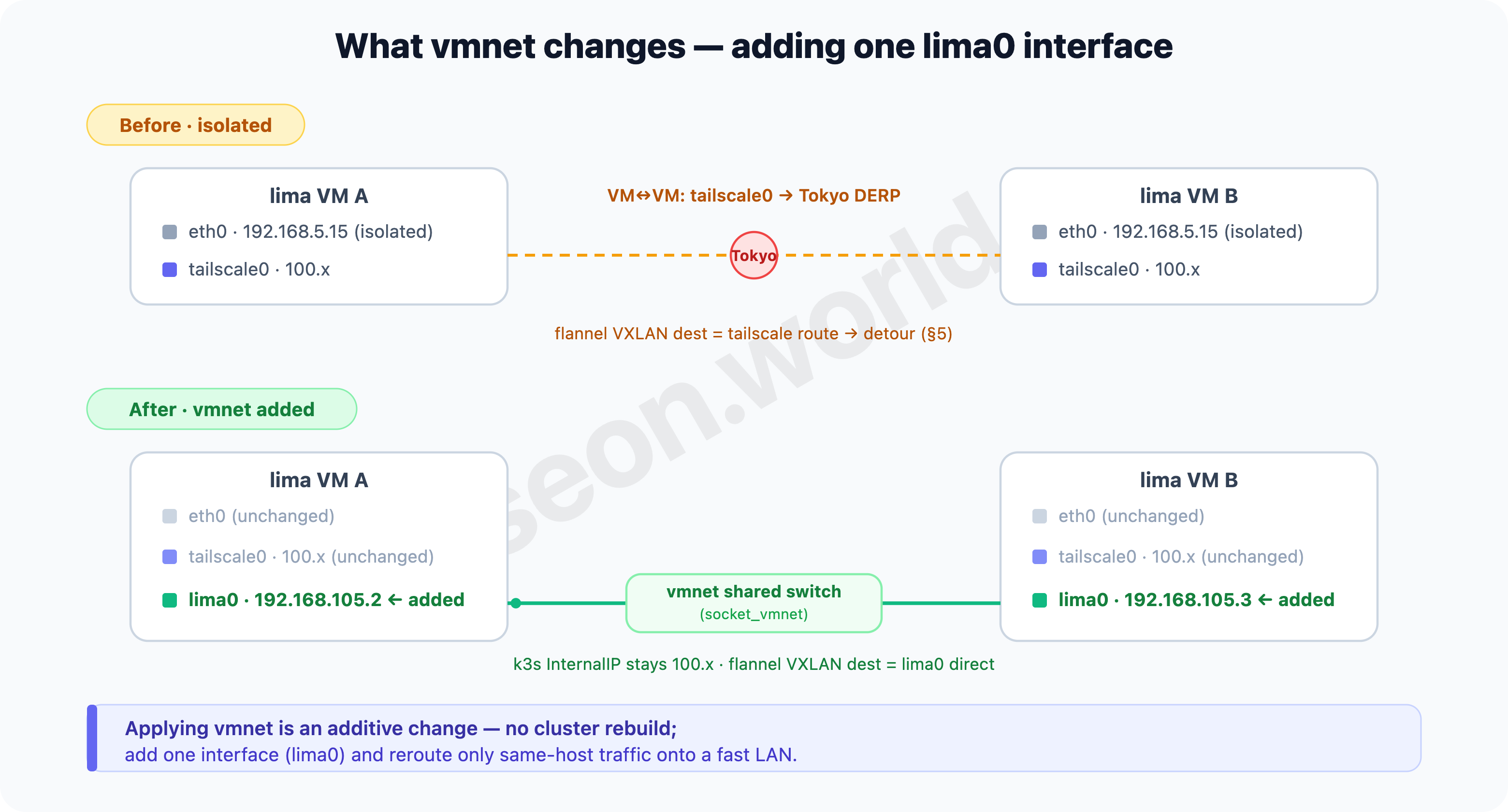
- Before — each VM had only
eth0(Lima’s default user-mode,192.168.5.15, mutually isolated) andtailscale0(100.x). With no direct path between VMs, inter-node traffic (including Pod VXLAN) leaked ontotailscale0, causing §5’s long-distance detour. - After — each VM gets one more interface,
lima0(vmnet shared,192.168.105.x).eth0andtailscale0stay as they were, and the k3s node’s InternalIP is still the Tailscale100.x, so the cluster’s identity and membership don’t change. Only the data path changes —lima0becomes the node’s default route, and per the rule from §2 (“flannel picks the default-route interface as its VXLAN destination / public-ip”), flannel moves its VXLAN destination tolima0. So Pod traffic between home nodes finishes over vmnet without going through the tailnet or DERP.
In short, it’s an additive change — without rebuilding the cluster or touching the nodes’ identity, you add one interface (lima0) and reroute only same-host traffic onto a fast LAN.
7-2. Install socket_vmnet (host = the iMac)
Because socket_vmnet is a daemon that runs as root, the binary must live on a root-owned path that a user can’t tamper with. Lima discourages installing it via Homebrew for security reasons, so build it from source into /opt/socket_vmnet. (Lima — VMNet)
git clone https://github.com/lima-vm/socket_vmnet
cd socket_vmnet
git checkout v1.2.2          # check the latest stable tag on the releases page
make
sudo make PREFIX=/opt/socket_vmnet install.bin
# → /opt/socket_vmnet/bin/socket_vmnet (root-owned)
7-3. Register the Lima sudoers entry
So Lima can launch socket_vmnet as root, lay down a sudoers fragment.
limactl sudoers > etc_sudoers.d_lima
less etc_sudoers.d_lima                 # review the contents first
sudo install -o root etc_sudoers.d_lima /etc/sudoers.d/lima
rm etc_sudoers.d_lima
7-4. Attach the shared network to each VM
Add the shared network to each VM’s ~/.lima/<vm>/lima.yaml. This network lays down 192.168.105.0/24 (gateway 192.168.105.1) and gives each VM an address in that range via a lima0 interface.
networks:
  - lima: shared
    interface: lima0
Note — duplicate
networks:key. If anetworks:key already exists in lima.yaml (even as a comment), appending another at the end causes a YAML duplicate-key parse error. Merge under the existing key.
7-5. Restart one at a time
Restart one VM at a time, confirming each goes Ready again (to minimize cluster impact).
for VM in k3s-agent k3s-agent-2 k3s-agent-3 k3s-agent-4; do
  limactl stop  "$VM"
  limactl start "$VM"
  kubectl --context k3s-lightsail wait --for=condition=Ready node/lima-"$VM" --timeout=180s
done
On restart, k3s comes back up and flannel re-picks its interface. Since the default route is now lima0 (192.168.105.1), flannel re-advertises its VXLAN destination (public-ip) as the vmnet address per the rule from §2 / §7-1 — with no extra flag like --flannel-iface.
7-6. Verify
Check that each VM got a vmnet address on lima0:
$ limactl shell k3s-agent -- ip -4 addr show lima0 | grep inet
    inet 192.168.105.2/24 ... lima0
Then re-measure ping between VMs on the same iMac:
$ limactl shell k3s-agent -- ping -c5 -q 192.168.105.3
5 packets transmitted, 5 received, 0% packet loss
rtt min/avg/max/mdev = 0.449/0.571/0.639/0.064 ms
The same-host VM-to-VM latency that was 87~133 ms dropped to the 0.5 ms range. The packets that had been round-tripping to Tokyo now finish inside the iMac.
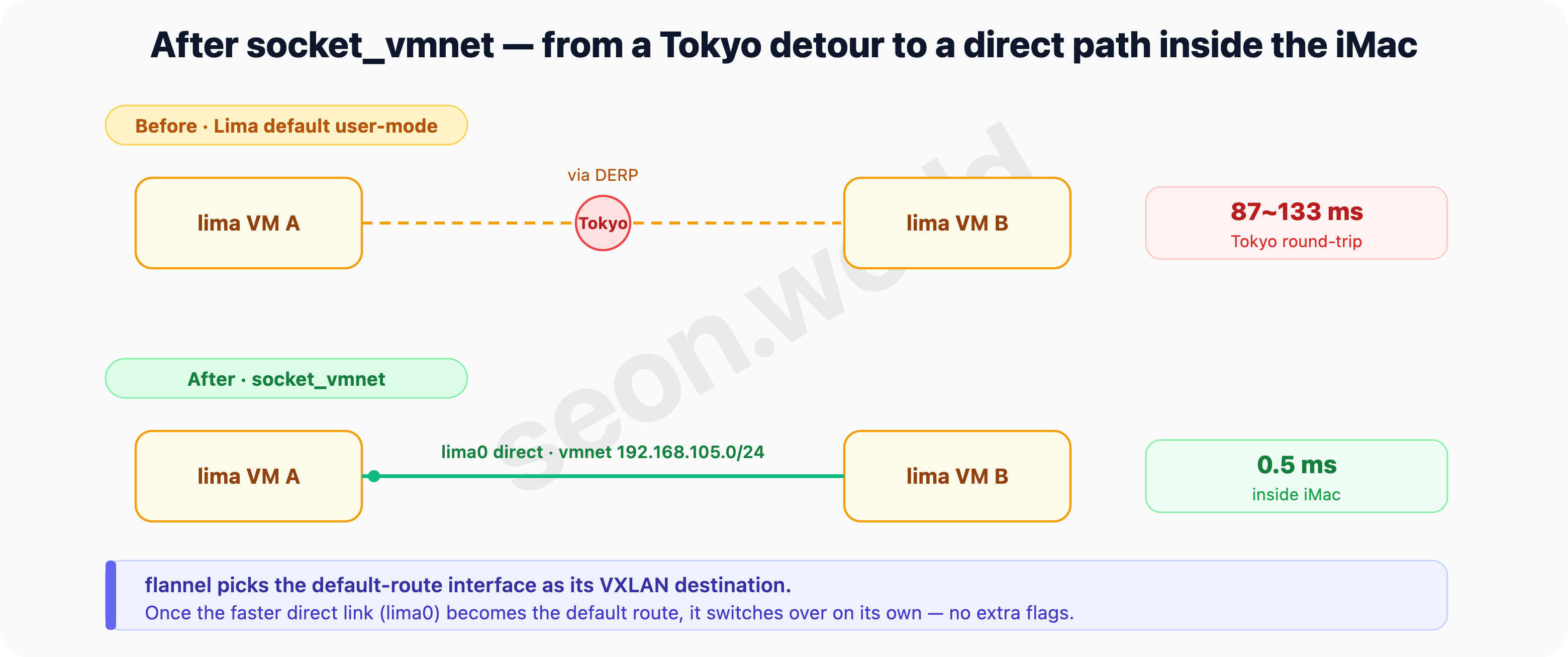
By default, flannel picks “the default-route interface” as its VXLAN destination. So if you give a node a faster direct path (here, vmnet’s
lima0) and make it the default route, flannel switches over to it on its own — with no extra CNI config.
8. Result — what vmnet changed, and the truth about 8472
After applying it, the VXLAN destination (public-ip) that flannel advertises splits cleanly into the two sites:
$ kubectl --context k3s-lightsail get nodes \
    -o custom-columns='NAME:.metadata.name,PUBLIC-IP:.metadata.annotations.flannel\.alpha\.coreos\.com/public-ip'
NAME               PUBLIC-IP
ip-172-26-2-70     172.26.2.70      # Tokyo (server) = VPC
ip-172-26-3-146    172.26.3.146
lima-k3s-agent     192.168.105.2    # home (lima) = vmnet
lima-k3s-agent-2   192.168.105.3
lima-k3s-agent-3   192.168.105.4
lima-k3s-agent-4   192.168.105.5
The four home nodes now exchange VXLAN directly over each other’s vmnet address (192.168.105.x) — 0.5 ms.
The 8472 I opened in §3 — I went to close it and looked at the actual route
With the home nodes sorted out by vmnet, it was time to close the 8472 I’d opened against principle in §3. But the moment I went to close it, I got nervous — what if closing it breaks inter-node Pod traffic again? Because in §3 I’d thought “opening it made it work.”
So before closing, instead of guessing I looked at the actual route. All you have to do is query the route from one node to a Pod on a node at the other site.
# from a home (lima) node to a Pod on a Tokyo (server) node
$ ip route get 10.42.0.235
10.42.0.235 dev tailscale0 table 52 src 100.84.x.x ...
dev tailscale0, not dev flannel.1. In other words, cross-site Pod traffic was flowing directly over Tailscale, not flannel VXLAN (8472).
Here’s the mechanism. In this cluster, each node advertises its own pod CIDR (10.42.N.0/24) as a Tailscale subnet route and accepts the others’ (accept-routes). So a remote node’s Pod range bypasses flannel and travels directly over the encrypted Tailscale (WireGuard). This is also the official way k3s binds a distributed / multi-cloud cluster with Tailscale (k3s — Distributed/multicloud, Tailscale — Subnet routers). So the “double encapsulation, wrapping VXLAN over WireGuard” from §2 / §5 was the old path of the same host (lima ↔ lima); cross-site is a single layer of WireGuard.
Having confirmed the route, I closed it — restricting it from public (0.0.0.0/0) to VPC-private (172.26.0.0/16). Then I re-measured after closing:
cross-site (home → Tokyo Pod)  : 20~26 ms   (Tailscale, unchanged)
home nodes (lima ↔ lima)       : 0.4 ms     (vmnet, unchanged)
servers (server ↔ server)      : 0.3 ms     (VPC VXLAN, unchanged)
6 nodes Ready                  : 6/6
Nothing broke. The public 8472 wasn’t the actual route of inter-node traffic — it was just a leftover. 8472 is still in use, but only inside private networks — lima ↔ lima over vmnet, server ↔ server over VPC.
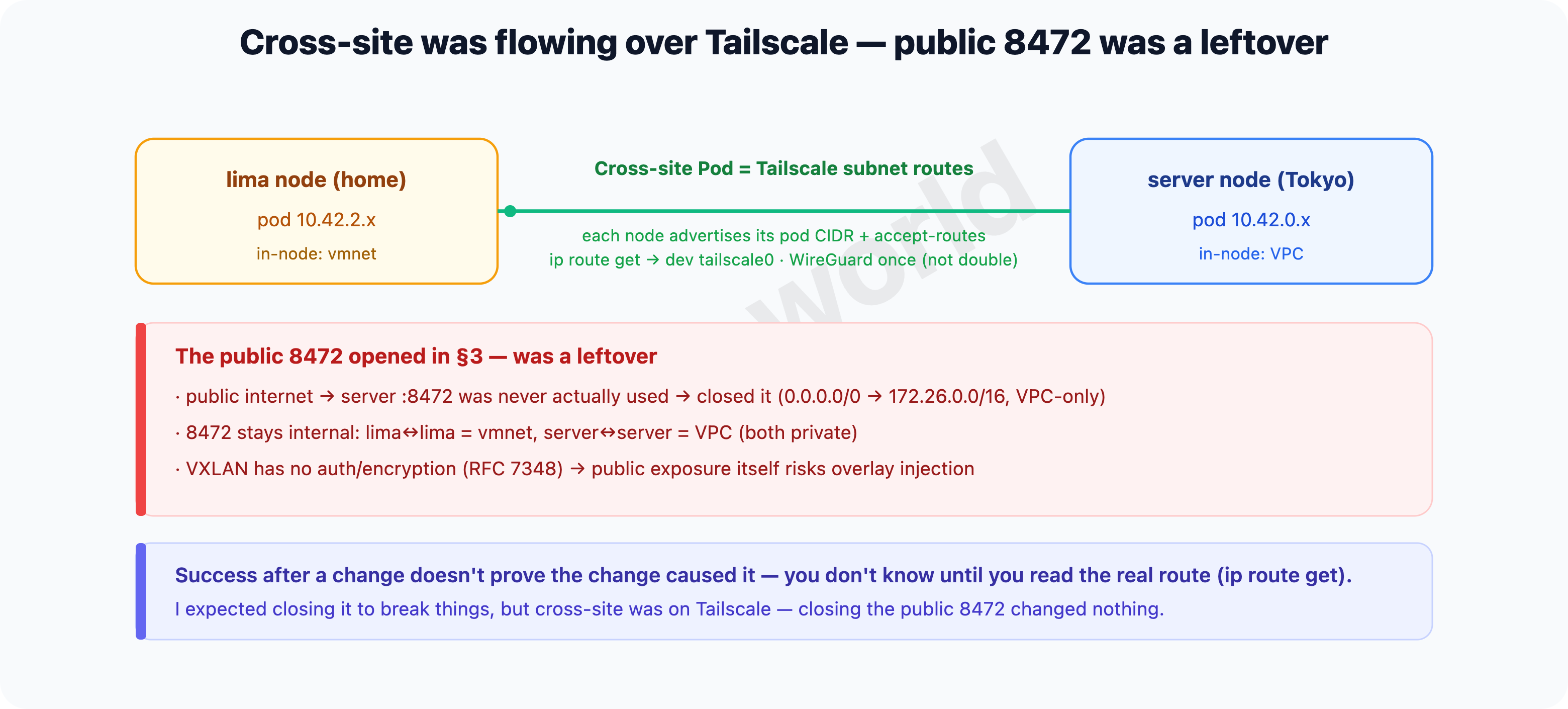
Why bother closing it? VXLAN is a protocol with no authentication and no encryption (RFC 7348’s security considerations also state plainly that “VXLAN itself provides no authentication or encryption”). Its only identifier is the VNI, and flannel’s default is 1, so anyone who can reach 8472 on the public net can inject packets into the Pod overlay (10.42.0.0/16). 6443 at least has a gate of certificates and tokens; 8472 doesn’t even have that. So while I was at it, I also closed the apiserver (6443) and kubelet (10250) to the public net — VPC/tailnet only — and restricted SSH (22) to the tailnet.
“It worked after a change” doesn’t mean “the change is why it worked.” Opening 8472 and traffic going through was a fact, but what actually carried the traffic was Tailscale — the public 8472 was a leftover from the start. Before you open and close ports on a guess, read the actual route once with
ip route get— that’s the cheapest way to cut costly exposure.
A remaining limit — cross-site is far, by the distance
What vmnet fixed is inside the same host (between home nodes). The Tokyo-cloud ↔ Sapporo-home leg is physically far apart, so it’s bound by Tailscale, and that latency (tens of ms) is a value set by distance that you can’t shrink.
So I compensate with placement — keep workloads with a lot of inter-node synchronous traffic (latency-sensitive ones) gathered within the home node group. I use the node-type=lima label I’d put on the home nodes back in #2, via a nodeSelector.
$ kubectl --context k3s-lightsail get nodes -L node-type
NAME               ...   NODE-TYPE
ip-172-26-2-70     ...   lightsail
ip-172-26-3-146    ...   lightsail
lima-k3s-agent     ...   lima
lima-k3s-agent-2   ...   lima
lima-k3s-agent-3   ...   lima
lima-k3s-agent-4   ...   lima
In a workload’s manifest, you write it like this (if the label isn’t there, set it first with kubectl label node lima-k3s-agent node-type=lima):
spec:
  template:
    spec:
      nodeSelector:
        node-type: lima       # this Pod group only on home nodes (vmnet, 0.5ms)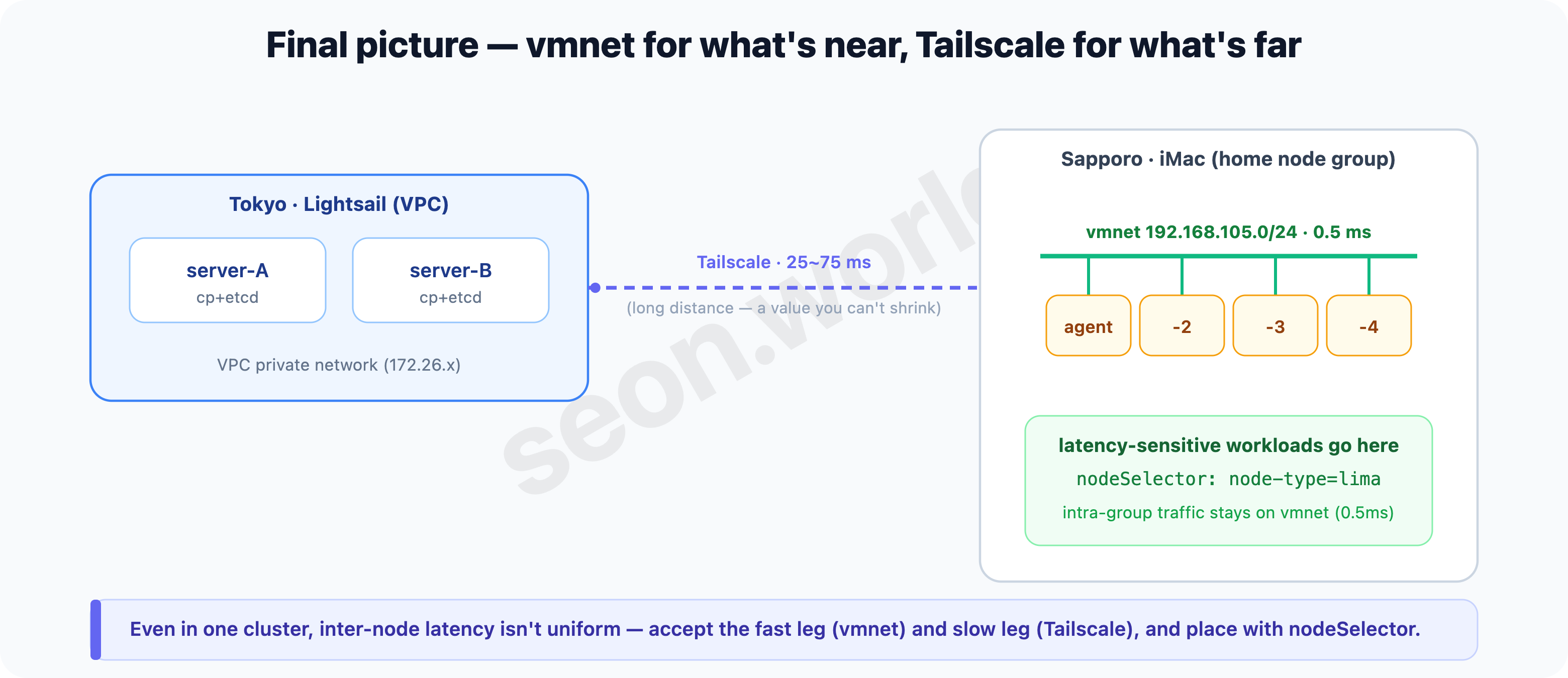
Even within one cluster, inter-node latency isn’t uniform. Accept the fast leg (same host = vmnet) and the slow leg (long distance = Tailscale), and place workloads by latency with a
nodeSelectorto steer around the slow leg.
9. Glossary — what came up this time
- flannel / VXLAN — k3s’s default CNI is flannel, its default backend VXLAN. It carries cross-node Pod packets encapsulated in UDP (8472).
- VTEP /
flannel.1— the endpoint that wraps and unwraps VXLAN capsules. Exists per node as theflannel.1interface. - flannel’s
public-ip— the destination each node advertises as “this is where I receive my VXLAN.” Defaults to the node’s default-route interface IP. - MTU — the maximum size of a single packet. Shrinks the more you encapsulate (Ethernet 1500 → VXLAN 1450 → 1230 over Tailscale).
- double encapsulation — wrapping a VXLAN packet again in WireGuard. Overhead, MTU squeeze, and latency pile up. (In this cluster it only happened for lima ↔ lima before vmnet; not for cross-site.)
- Tailscale / DERP — a WireGuard-based mesh VPN. When a direct (P2P) path isn’t possible, it detours through a DERP relay.
- Tailscale subnet route — a node advertises a range (here, its own pod CIDR) with
--advertise-routes, another node receives it with--accept-routes, and that range’s traffic travels over the tailnet (WireGuard). Cross-site Pod traffic flows over this road. - NAT (endpoint-dependent mapping) — a NAT where the port mapping varies by destination. Direct P2P is hard, so it falls back to DERP.
- vmnet (
vmnet.framework) — Apple’s framework that provides NAT, bridges, and host networking to VMs on macOS. - socket_vmnet — a root daemon that exposes
vmnet.frameworkover a Unix socket. VMs connect to the socket without root, get a shared LAN (192.168.105.0/24), and talk directly at L2 between VMs on the same host. - Lima user-mode network — Lima’s default network (fixed at
192.168.5.0/24). Isolates VMs from each other and from the host. node-typelabel / nodeSelector — a label on the nodes (here, lima/lightsail). Used in anodeSelectorto place workloads on a particular group of nodes.
10. Next
With inter-node traffic sorted out, I can finally run all sorts of services stably on these six nodes.
In the end, the important problem that Longhorn surfaced was solved well, and it’s still running stably today. That said, given the nodes’ spec limits, I decided to give up on Longhorn for now. Once I have a roomier environment, I’m leaving “put it back and test it” as homework.
What I’ve written up to now lets me run a fair range of services, but optimization and other small issues I’ve been handling as I operate. Once the material piles up a bit, I’d like to gather and organize that too.
Next time I plan to talk about CloudNativePG (CNPG). Right as the inter-node networking got solved, I set up CNPG to practice and verify running a service with internal clustering — and it’s now serving as the main DB for quite a few services.
Thanks for reading all the way through.
References
- k3s — Basic Network Options / Requirements / Distributed·multicloud (Tailscale integration): docs.k3s.io/networking/basic-network-options · /installation/requirements · /networking/distributed-multicloud
- flannel — Backends (VXLAN · 8472 · MTU): github.com/flannel-io/flannel … backends.md
- Longhorn — What is Longhorn / Best Practices / KB (volume readonly or I/O error): longhorn.io/docs/1.11.2/what-is-longhorn · /best-practices · /kb/troubleshooting-volume-readonly-or-io-error
- Tailscale — Device connectivity / How NAT traversal works / Subnet routers: tailscale.com/kb/1411/device-connectivity · tailscale.com/blog/how-nat-traversal-works · tailscale.com/kb/1019/subnets
- Lima / socket_vmnet — User-mode network / VMNet: lima-vm.io/docs/config/network/user · /vmnet · github.com/lima-vm/socket_vmnet
- VXLAN security (no auth/encryption) — RFC 7348 §6 Security Considerations